Acceleration City
Acceleration City
Play on playaccelerationcity.com ↗Opens on playaccelerationcity.com in a new tab. Check the setup notes below before starting.
About Acceleration City
Explore the CS2N driving world and learn to program a CoBot using the independent GameHubs player guide.
Acceleration City is a browser driving and programming world created by Carnegie Mellon Robotics Academy. The GameHubs site provides a focused player and getting-started guide, while the actual game loads from the original CS2N activity. OttersPlay opens that guide in a new tab because Playaccelerationcity.com only allows its player page to be framed by its own site.
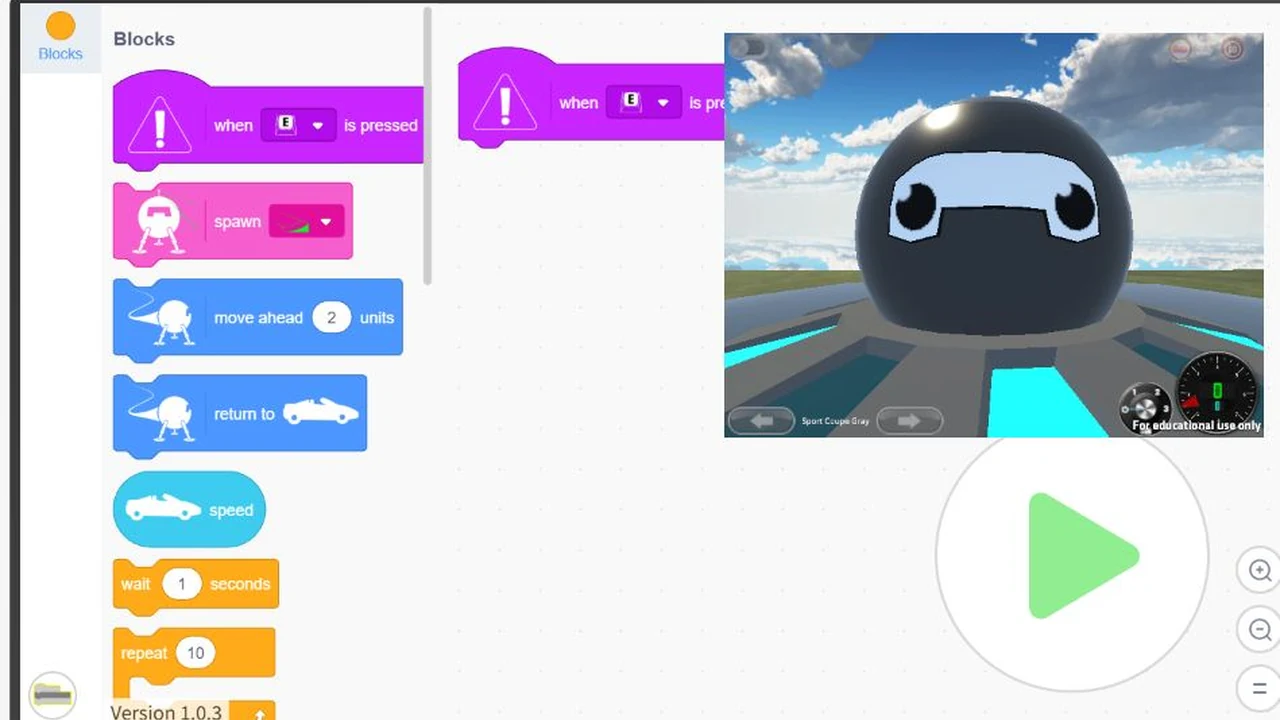
Explore the city, find races and collect Minanimals. A programmable CoBot partner can help you build a route, but its behavior depends on the program you create. Use the game’s Blocks editor and in-game help to connect actions to keyboard inputs or colored areas on a track. There is no one universal CoBot shortcut that guarantees a particular building action for every program.
Use a computer with a keyboard and a current browser that supports WebGL. The guide does not add a new touch control system to the original game. After pressing Play, give the 3D activity time to initialize, then click the game to focus input. If it remains blank, try the player’s Reload or direct original-game link. Reloading can discard unsaved progress; for classroom activities, follow the official academy’s learning resources rather than treating the independent guide as the course provider.
About the game
The original activity is hosted by CS2N. Playaccelerationcity.com is a separate GameHubs website that credits the academy, adds a focused player and links to the official Hour of Code resources. It is not a new port or an AI-made recreation.
Made by Carnegie Mellon Robotics Academy; GameHubs guide.
How to play
A desktop or laptop with a keyboard, JavaScript and WebGL. Loading also requires access to activities.cs2n.org; phone-only controls and full gameplay have not been verified by OttersPlay.
| Keyboard | Use the movement bindings shown by the original game |
|---|---|
| Click inside the player | Give the game keyboard focus |
| Blocks editor | Configure CoBot actions and their inputs |
| Player Reload / focus view | Restart loading or give the game more space |
Quick facts
- Original game by Carnegie Mellon Robotics Academy
- Game files load from the CS2N activity
- CoBot actions depend on your Blocks program
- Keyboard recommended; no added phone control scheme
Questions about Acceleration City
Who made the original game?
The original Acceleration City activity is by Carnegie Mellon Robotics Academy. GameHubs maintains the independent player guide.
Is the CoBot controlled by one fixed shortcut?
Its actions depend on your program. Use the Blocks editor and in-game help to connect actions to keyboard inputs or colored areas.
Can I play with phone-only touch controls?
A computer with a keyboard is recommended. The player guide does not add touchscreen controls to the original activity.
Why does this open a new tab?
The player site sets a same-site framing policy. Opening its full page keeps that policy and the original-game fallback intact.
Tips for Acceleration City
- Read the in-game help before relying on an assumed key binding.
- Start with a small CoBot program and test each action.
- Give the WebGL world time to initialize before choosing Reload.
This game site is maintained by GameHubs, under the same ownership as OttersPlay.
Sources: playaccelerationcity.com, activities.cs2n.org. Last checked .