Minecraft Classic
Minecraft Classic
Play on classic.minecraft.net ↗Opens on classic.minecraft.net in a new tab. Check the setup notes below before starting.
About Minecraft Classic
Mojang's official web release of 2009 Minecraft Classic. Build with 32 original blocks and invite up to nine friends into your creative world.
Minecraft Classic lets you relive the earliest creative building experience from 2009. There are no crafting recipes, health bars, survival hunger, or hostile mobs—just pure, unrestricted block placement across randomly generated nostalgic terrain.
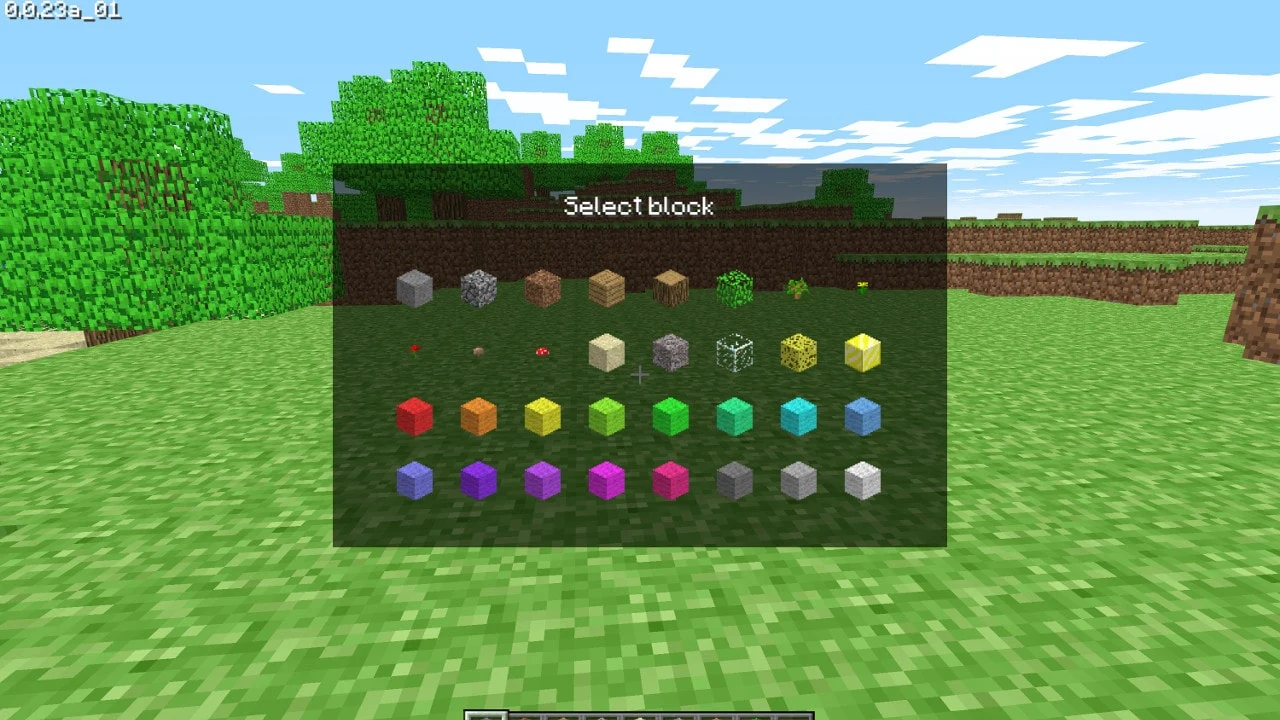
The building palette contains the original 32 classic blocks, including colored wool, cobblestone, dirt, sand, gold, saplings, and raw bedrock. Building is instantaneous with unlimited inventory supplies.
Multiplayer is baked directly into the web page. Generating a world produces a unique share link that lets you invite up to nine friends into your session with zero server setup or port forwarding.
About the game
To celebrate Minecraft's 10th anniversary in May 2019, Mojang Studios ported the original 2009 Creative mode release (0.0.23a_01) to modern web browsers. Built using JavaScript and WebGL, the release preserves the historic early interface, retro generation algorithms, and original 32 building blocks exactly as Notch coded them.
Made by Mojang Studios.
How to get Minecraft Classic running
- Open the game in any desktop web browser (Chrome, Firefox, Edge or Safari).
- Copy the multiplayer invitation link shown on the screen to play with friends.
- Pick a player name and click Start to generate your world.
How to play
Desktop browser with keyboard and mouse. WebGL and JavaScript enabled.
| WASD | Move forward, backward, strafe left, right |
|---|---|
| Space | Jump |
| Left Click | Destroy block |
| Right Click | Place selected block |
| B | Open building blocks selection menu |
| G | Spawn friendly test mob |
| T | Chat with connected multiplayer friends |
| Enter | Set spawn point |
Quick facts
- Official release by Mojang Studios for Minecraft's 10th anniversary
- Accurate recreation of version 0.0.23a_01 from 2009
- Contains the original 32 classic block types
- Instant peer-to-peer multiplayer for up to 10 players via shareable URLs
- Runs on pure HTML5/JavaScript without Java plugins
Questions about Minecraft Classic
Is Minecraft Classic an official game?
Yes. Minecraft Classic was ported and released directly by Mojang Studios in May 2019 to celebrate Minecraft's 10th anniversary. It runs officially on classic.minecraft.net.
Can I play survival mode in Minecraft Classic?
No. Minecraft Classic is based on the 2009 Creative release 0.0.23a_01, which predates survival mechanics, crafting tables, tools, and enemies. All 32 blocks are unlimited.
How do I invite friends in Minecraft Classic?
When the game generates your world, it provides a unique web link on the setup screen. Copy that link and send it to up to nine friends to join your world instantly.
Can I save my buildings in Minecraft Classic?
No, worlds in Minecraft Classic only persist while your browser tab remains active. Once you close the tab, the temporary creative world is reset.
Tips for Minecraft Classic
- Press B to open the original block palette and pick any of the 32 classic blocks or colored wool varieties.
- Tap G on your keyboard to spawn wandering human figures into your world.
- Press Enter to anchor a custom spawn point if you are constructing large towers or skybases.
Minecraft Classic is Mojang’s official 2009 browser release. OttersPlay is an independent directory and does not host or modify the game.
Sources: classic.minecraft.net, minecraft.net. Last checked .